GROBID Service API
The GROBID Web API provides a simple and efficient way to use the tool. A service console is available to test GROBID in a human friendly manner. For production and benchmarking, we strongly recommend to use this web service mode on a multi-core machine and to avoid running GROBID in the batch mode.
Start the server with Docker
This is the recommended and standard way to run the Grobid web services, see here.
Start a development server with Gradle
Go under the grobid/ main directory. Be sure that the GROBID project is built, see Install GROBID.
The following command will start the server on the default port 8070:
./gradlew run
(the Gradle process will hang at something like 88%, this is normal because the web service is ran sharing the same JVM as Gradle)
Install and run the service as standalone application
From a development installation, you can also build and install the service as a standalone service - here let's supposed the destination directory is grobid-installation:
./gradlew clean assemble
cd ..
mkdir grobid-installation
cd grobid-installation
unzip ../grobid/grobid-service/build/distributions/grobid-service-0.9.0.zip
mv grobid-service-0.9.0 grobid-service
unzip ../grobid/grobid-home/build/distributions/grobid-home-0.9.0.zip
./grobid-service/bin/grobid-service
The directory grobid-installation should have the following structure:
.
├── grobid-home
└── grobid-service
Service checks
You can check whether the service is up and running by opening the following URL:
- http://yourhost:8070/api/version will return you the current version and the revision of the running service. The revision is obtained via
git describe --tags --always --first-parentand follows the format<tag>-<N>-g<hash>(e.g.0.9.0-70-g94429f4e2meaning 70 commits after tag 0.9.0, at commit94429f4e2). In the web console, the revision links to the corresponding commit on GitHub. - http://yourhost:8070/api/isalive (liveness) returns
true/falseas plain text indicating whether the service completed initialization successfully. Returns HTTP 200 when alive, HTTP 503 when not initialized or initialization failed. Suitable for use as a liveness probe in container orchestrators (Docker, Kubernetes). - http://yourhost:8070/api/health (readiness) returns a JSON object with detailed status including initialization state, engine pool metrics (active/idle/max engines), and configuration checks. Returns HTTP 200 when ready to process requests, HTTP 503 otherwise. Suitable for use as a readiness probe.
The service provides also an admin console, reachable at http://yourhost:8071 where some additional checks like ping, metrics, hearthbeat are available. We recommend, in particular to have a look at the metrics (using the Metric library) which are providing the rate of execution as well as the throughput of each entry point.
In addition, metrics in Prometheus exposition format are available at http://yourhost:8071/metrics/prometheus. This includes both the application metrics (rate/throughput per entry point) and JVM/process metrics (heap, GC, threads, CPU). A Prometheus server can scrape this endpoint and the metrics can then be visualised and alerted on in Grafana. The service can also push metrics over OTLP (e.g. to Grafana Cloud) instead of being scraped. See Monitoring with Prometheus for a step-by-step setup of both the pull and push paths.
Configure the server
If required, modify the file under grobid/grobid-home/config/grobid.yaml for starting the server on a different port or if you need to change the absolute path to your grobid-home (e.g. when running on production). By default grobid-home is located under grobid/grobid-home. grobid-home contains all the models and static resources required to run GROBID.
See the configuration page for details on how to set the different parameters of the grobid.yaml configuration file. Service and logging parameters are also set in this configuration file.
If Docker is used, see here on how to start a Grobid container with a modified configuration file.
Model loading strategy
You can choose to load all the models at the start of the service or lazily when a model is used the first time. Preloading all the models at server start is the default setting. Loading all models at startup will slow down the start of the server and will use more memory than the lazy mode in case only a few services will be used. You can switch to lazy loading of the model:
grobid:
  # for **service only**: how to load the models,
  # false -> models are loaded when needed, avoiding putting in memory useless models (only in case of CRF) but slow down
  #          significantly the service at first call
  # true -> all the models are loaded into memory at the server startup (default), slow the start of the services
  #         and models not used will take some more memory (only in case of CRF), but server is immediately warm and ready
  modelPreload: true
Errors handling
The structure of errors is organised as follows:
| HTTP Status code | reason |
|---|---|
| 200 | Successful operation. |
| 204 | Process was completed, but no content could be extracted and structured |
| 400 | Wrong request, missing parameters, missing header |
| 500 | Indicate an internal service error, further described by a provided message |
| 503 | The service is not available, which usually means that all the threads are currently used |
However, there are some specific errors related to the processing that should be considered. The following table provides the Grobid error codes, the related HTTPS error and a description and suggestion/explanation:
| Error Code | HTTP Status Code | Description | Possible Cause / Suggested Action |
|---|---|---|---|
BAD_INPUT_DATA |
500 (Internal Server Error) | The input data is not correct (e.g., unreadable or missing PDF). | Check that the PDF is valid and supplied in the request. |
NO_BLOCKS |
500 (Internal Server Error) | The PDF contains no text blocks (likely a scanned document without OCR, only images). | Ensure the PDF has selectable text; consider running OCR if it is image-only. |
TOO_MANY_BLOCKS |
500 (Internal Server Error) | The PDF has too many text blocks; Grobid avoids processing very large documents for safety. | Try splitting the document or processing fewer pages at a time. |
TOO_MANY_TOKENS |
500 (Internal Server Error) | The PDF contains too many tokens (words); Grobid avoids processing very large documents for safety. | Try splitting the document or processing fewer pages at a time. |
TIMEOUT |
500 (Internal Server Error) | The PDF took too long to process and was stopped. | Try with a smaller or simpler document; check server resources. |
TAGGING_ERROR |
500 (Internal Server Error) | The DeLFT/CRF tagging process failed (model mismatch or tagging engine error). | Check model compatibility between grobid-home and grobid-core; verify model files. |
PARSING_ERROR |
500 (Internal Server Error) | The PDF parsing process failed (XML parsing, vector graphics processing, or file structure issues). | Check PDF file integrity; verify XML structure; report with specific file and logs. |
GENERAL |
500 (Internal Server Error) | A general internal error occurred (possible bug in Grobid). | Check logs for details; report the issue with relevant files and logs. |
PDFALTO_CONVERSION_FAILURE |
500 (Internal Server Error) | The PDF could not be converted by pdfalto (damaged file or pdfalto bug). | Try opening the PDF manually; if valid, report the issue with the file. |
Tip
- "Blocks" refer to logical text regions detected in the PDF (e.g., paragraphs, headers).
- "Tokens" refer to individual words or symbols.
- "Tagging" refers to the process of assigning labels to tokens using statistical models.
- When reporting issues related to the error of type
GENERAL, please provide as much detail as possible, such as input PDF document, log files.
CORS (Cross-Origin Resource Share)
By default, Grobid allows API access from any origin.
The configuration can be modified, for example to restrict origin, methods and header of access, through the YAML configuration file grobid-home/config/grobid.yaml:
grobid:
  corsAllowedOrigins: "grobid.com"
  corsAllowedMethods: "OPTIONS,GET,PUT,POST,DELETE,HEAD"
  corsAllowedHeaders: "X-Requested-With,Content-Type,Accept,Origin"
Clients for GROBID Web Services
We provide clients written in Python, Java, node.js using the GROBID PDF-to-TEI conversion Web services for parallel batch processing:
All these clients will take advantage of the multi-threading for scaling PDF batch processing. As a consequence, they will be much more efficient than the batch command lines (which use only one thread) and should be preferred. The Python client is the more up-to-date and complete and can be adapted for your needs.
Alternative output formats (Markdown and JSON)
The GROBID REST API produces TEI XML — a rich, loss-less representation of the extracted structure. For downstream use cases where TEI is inconvenient (feeding an LLM, building a search index, rendering a preview), the Python GROBID client ships optional client-side converters that transform the TEI response into simpler formats:
- Markdown — a flat, human-readable rendering of the document body with headings, paragraphs, lists, and inline references. Useful for feeding extracted content into language models or Markdown-based documentation tools.
- JSON — a lossy, structured representation inspired by the CORD-19 schema, with separate sections for bibliographic metadata, body text, figures and tables, and references. Useful for downstream indexing, analytics, or feeding structured data into other tools.
These formats are optional — TEI remains the source of truth
The converters run on the client side, after the TEI response has been received from the GROBID server. The server itself always returns TEI XML; the Python client then optionally projects it into Markdown or JSON if you ask it to. Both formats are lossy compared to the full TEI output — in particular, fine-grained layout information, coordinates, and some bibliographic metadata are simplified or dropped. If you need the complete structure, stick with TEI.
See the grobid-client-python README for the exact options to enable Markdown or JSON output when calling the client.
Use GROBID test console
On your browser, the welcome page of the service console is available at the URL http://localhost:8070.
On the service console, the REST API can be tested under the TEI tab for service returning a TEI document, under the PDF tab for services returning annotations relative to PDF or an annotated PDF and under the Patent tab for patent-related services:
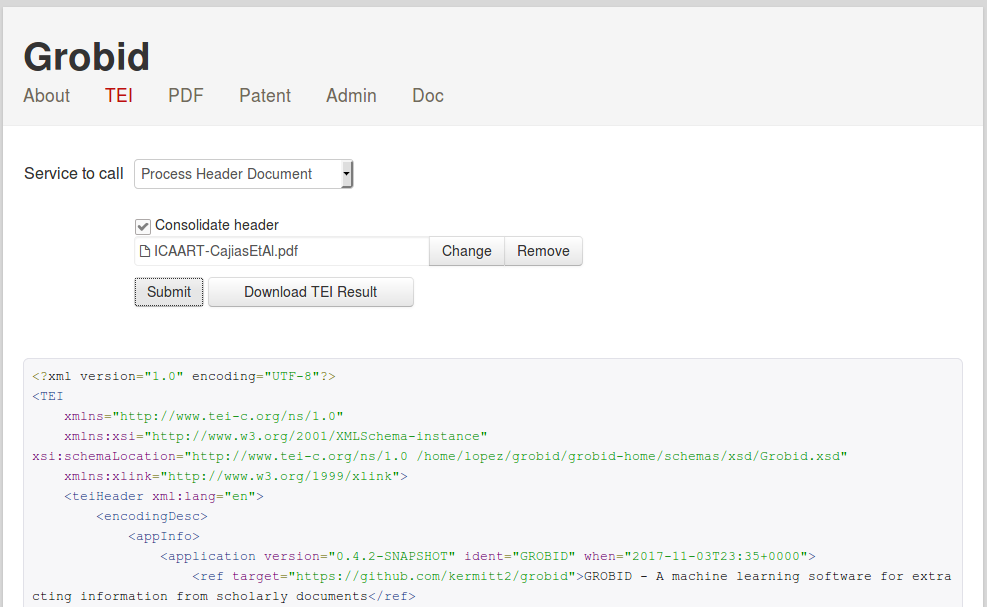
The services returning JSON results for dynamic PDF annotation purposes can be tested under the PDF tab. The PDF is rendered with PDF.js and the console javascript offers a reference implementation on how to use the returned annotations with coordinates for web application,

Still to demonstrate PDF.js annotation possibilities, by default bibliographical reference for which a DOI (or arXiv ID) is extracted or found by consolidation are made clickable on the original rendered PDF:

GROBID Web Services
We describe below the provided resources corresponding to the HTTP verbs, to use the grobid web services. All url described below are relative path, the root url is http://<server instance name>/<root context>
The consolidation parameters (consolidateHeader, consolidateCitations, consolidateFunders) indicate if GROBID should try to complete the extracted metadata with an additional external call to CrossRef API or biblio-glutton. The CrossRef and biblio-glutton look-up are realized based on the reliable subset of extracted metadata which are supported by these API. Each consolidation parameter is a string which can have three values:
0, means no consolidation at all is performed: all the metadata will come from the source PDF1, means consolidation against CrossRef/biblio-glutton and update of metadata: when we have a DOI match, the publisher metadata are combined with the metadata extracted from the PDF, possibly correcting them2, means consolidation against CrossRef/biblio-glutton and, if matching, addition of the DOI only
The consolidation for header can use a fourth value (3), restricting the consolidation to the usage of DOI only, if a DOI has been extracted in the header section.
PDF to TEI conversion services
/api/processHeaderDocument
Extract the header of the input PDF document, normalize it and convert it into a TEI XML or BibTeX format.
consolidateHeader is a string of value 0 (no consolidation), 1 (consolidate and inject all extra metadata, default value), 2 (consolidate the header metadata and inject DOI only) or 3 (consolidate using only extracted DOI, if extracted, and do not try to consolidate using any other metadata).
| method | request type | response type | parameters | requirement | description |
|---|---|---|---|---|---|
| POST, PUT | multipart/form-data |
application/xml |
input |
required | PDF file to be processed |
consolidateHeader |
optional | consolidateHeader is a string of value 0 (no consolidation), 1 (consolidate and inject all extra metadata, default value), 2 (consolidate the header and inject DOI only), or 3 (consolidate using only extracted DOI - if extracted) . |
|||
includeRawAffiliations |
optional | includeRawAffiliations is a boolean value, 0 (default, do not include raw affiliation string in the result) or 1 (include raw affiliation string in the result). |
|||
includeRawCopyrights |
optional | includeRawCopyrights is a boolean value, 0 (default, do not include raw copyrights/license string in the result) or 1 (include raw copyrights/license string in the result). |
|||
start |
optional | Start page number of the PDF to be considered, previous pages will be skipped/ignored, integer with first page starting at 1, (default -1, start from the first page of the PDF) |
|||
end |
optional | End page number of the PDF to be considered, next pages will be skipped/ignored, integer with first page starting at 1 (default 2, end with the last page of the PDF) |
|||
debugMode |
optional | If 1 or true, replaces the structured response with a text/plain dump of the raw CRF/sequence-labelling output of each model invoked during processing. See Debug raw labelling output. |
|||
models |
optional | Comma-separated list of model names to include in the debug response (e.g. segmentation,header). Only meaningful when debugMode is enabled. The pipeline still runs in full; this only filters the response. Unknown model names yield 400. |
Use Accept: application/x-bibtex to retrieve BibTeX format instead of XML TEI.
However, please bear in mind that the TEI XML format is much richer and structured, it should be preferred if there is no particular reason to use BibTeX, so we recommend to always use Accept: application/xml.
Response status codes:
| HTTP Status code | reason |
|---|---|
| 200 | Successful operation. |
| 204 | Process was completed, but no content could be extracted and structured |
| 400 | Wrong request, missing parameters, missing header |
| 500 | Indicate an internal service error, further described by a provided message |
| 503 | The service is not available, which usually means that all the threads are currently used |
A 503 error with the default parallel mode normally means that all the threads available to GROBID are currently used. The client need to re-send the query after a wait time that will allow the server to free some threads. The wait time depends on the service and the capacities of the server, we suggest 2 seconds for the processHeaderDocument service.
You can test this service with the cURL command lines, for instance header extraction from a PDF file in the current directory:
curl -v -H "Accept: application/xml" --form input=@./thefile.pdf localhost:8070/api/processHeaderDocument
If you want a simpler result in the BibTeX format:
curl -v -H "Accept: application/x-bibtex" --form input=@./thefile.pdf localhost:8070/api/processHeaderDocument
/api/processFulltextDocument
Convert the complete input document into TEI XML format (header, body and bibliographical section).
| method | request type | response type | parameters | requirement | description |
|---|---|---|---|---|---|
| POST, PUT | multipart/form-data |
application/xml |
input |
required | PDF file to be processed |
consolidateHeader |
optional | consolidateHeader is a string of value 0 (no consolidation), 1 (consolidate and inject all extra metadata, default value), 2 (consolidate the citation and inject DOI only), or 3 (consolidate using only extracted DOI - if extracted). |
|||
consolidateCitations |
optional | consolidateCitations is a string of value 0 (no consolidation, default value) or 1 (consolidate and inject all extra metadata), or 2 (consolidate the citation and inject DOI only). |
|||
consolidatFunders |
optional | consolidateFunders is a string of value 0 (no consolidation, default value) or 1 (consolidate and inject all extra metadata), or 2 (consolidate the funder and inject DOI only). |
|||
includeRawCitations |
optional | includeRawCitations is a boolean value, 0 (default, do not include raw reference string in the result) or 1 (include raw reference string in the result). |
|||
includeRawAffiliations |
optional | includeRawAffiliations is a boolean value, 0 (default, do not include raw affiliation string in the result) or 1 (include raw affiliation string in the result). |
|||
includeRawCopyrights |
optional | includeRawCopyrights is a boolean value, 0 (default, do not include raw copyrights/license string in the result) or 1 (include raw copyrights/license string in the result). |
|||
teiCoordinates |
optional | list of element names for which coordinates in the PDF document have to be added, see Coordinates of structures in the original PDF for more details | |||
segmentSentences |
optional | Paragraphs structures in the resulting TEI will be further segmented into sentence elements |
|||
generateIDs |
optional | if supplied as a string equal to 1, it generates unique identifiers for each text component |
|||
start |
optional | Start page number of the PDF to be considered, previous pages will be skipped/ignored, integer with first page starting at 1, (default -1, start from the first page of the PDF) |
|||
end |
optional | End page number of the PDF to be considered, next pages will be skipped/ignored, integer with first page starting at 1 (default -1, end with the last page of the PDF) |
|||
flavor |
optional | Indicate which flavor to apply for structuring the document. Useful when the default structuring cannot be applied to a specific document (e.g. the body is empty. More technical details and available flavor names in the dedicated page. | |||
debugMode |
optional | If 1 or true, replaces the TEI XML response with a text/plain dump of the raw CRF/sequence-labelling output of each model invoked during processing. See Debug raw labelling output. |
|||
models |
optional | Comma-separated list of model names to include in the debug response (e.g. segmentation,header,fulltext,citation). Only meaningful when debugMode is enabled. The pipeline still runs in full; this only filters the response. Unknown model names yield 400. |
Response status codes:
| HTTP Status code | reason |
|---|---|
| 200 | Successful operation. |
| 204 | Process was completed, but no content could be extracted and structured |
| 400 | Wrong request, missing parameters, missing header |
| 500 | Indicate an internal service error, further described by a provided message |
| 503 | The service is not available, which usually means that all the threads are currently used |
A 503 error with the default parallel mode normally means that all the threads available to GROBID are currently used. The client need to re-send the query after a wait time that will allow the server to free some threads. The wait time depends on the service and the capacities of the server, we suggest 5-10 seconds for the processFulltextDocument service.
The optional sentence segmentation in the TEI XML result is based on the algorithm selected in the Grobid configuration file (under grobid-home/config/grobid.yaml). As of August 2020, available segmenters are OpenNLP sentence detector (recommended for scientific articles after evaluation) and the Pragmatic_Segmenter.
You can test this service with the cURL command lines, for instance fulltext extraction (header, body and citations) from a PDF file in the current directory:
curl -v --form input=@./thefile.pdf localhost:8070/api/processFulltextDocument
fulltext extraction and add coordinates to the figures (and tables) only:
curl -v --form input=@./12248_2011_Article_9260.pdf --form teiCoordinates=figure --form teiCoordinates=biblStruct localhost:8070/api/processFulltextDocument
fulltext extraction and add coordinates for all the supported coordinate elements (sorry for the ugly cURL syntax on this, but that's how cURL is working!):
curl -v --form input=@./12248_2011_Article_9260.pdf --form teiCoordinates=persName --form teiCoordinates=figure --form teiCoordinates=ref --form teiCoordinates=biblStruct --form teiCoordinates=formula localhost:8070/api/processFulltextDocument
Regarding the bibliographical references, it is possible to include the original raw reference string in the parsed bibliographical result with the parameter includeRawCitations set to 1:
curl -v --form input=@./thefile.pdf --form includeRawCitations=1 localhost:8070/api/processFulltextDocument
Similar raw strings can be added in the result for affiliation and copyrights/license sections.
Example with requested additional sentence segmentation of the paragraph with bounding box coordinates of the sentence structures:
curl -v --form input=@./0thefile.pdf --form segmentSentences=1 --form teiCoordinates=s localhost:8070/api/processFulltextDocument
Example for processing a given PDF from page 3 (included) to the last page (page 1 and 2 will be ignored, by convention the index of the first page of a PDF is 1):
curl -v --form input=@./thefile.pdf --form start=3 localhost:8070/api/processFulltextDocument
/api/processReferences
Extract and convert all the bibliographical references present in the input document into TEI XML or BibTeX format.
| method | request type | response type | parameters | requirement | description |
|---|---|---|---|---|---|
| POST, PUT | multipart/form-data |
application/xml |
input |
required | PDF file to be processed |
consolidateCitations |
optional | consolidateCitations is a string of value 0 (no consolidation, default value) or 1 (consolidate and inject all extra metadata), or 2 (consolidate the citation and inject DOI only). |
|||
includeRawCitations |
optional | includeRawCitations is a boolean value, 0 (default. do not include raw reference string in the result) or 1 (include raw reference string in the result). |
|||
debugMode |
optional | If 1 or true, replaces the response with a text/plain dump of the raw CRF/sequence-labelling output of each model invoked during processing. See Debug raw labelling output. |
|||
models |
optional | Comma-separated list of model names to include in the debug response (e.g. segmentation,reference-segmenter,citation). Only meaningful when debugMode is enabled. The pipeline still runs in full; this only filters the response. Unknown model names yield 400. |
Use Accept: application/x-bibtex to retrieve BibTeX instead of TEI.
Response status codes:
| HTTP Status code | reason |
|---|---|
| 200 | Successful operation. |
| 204 | Process was completed, but no content could be extracted and structured |
| 400 | Wrong request, missing parameters, missing header |
| 500 | Indicate an internal service error, further described by a provided message |
| 503 | The service is not available, which usually means that all the threads are currently used |
A 503 error with the default parallel mode normally means that all the threads available to GROBID are currently used. The client need to re-send the query after a wait time that will allow the server to free some threads. The wait time depends on the service and the capacities of the server, we suggest 3-6 seconds for the processReferences service.
You can test this service with the cURL command lines, for instance extraction and parsing of all references from a PDF in the current directory without consolidation (default value):
curl -v --form input=@./thefile.pdf localhost:8070/api/processReferences
It is possible to include the original raw reference string in the parsed result with the parameter includeRawCitations set to 1:
curl -v --form input=@./thefile.pdf --form includeRawCitations=1 localhost:8070/api/processReferences
Debug raw labelling output
The debugMode parameter on /api/processFulltextDocument, /api/processFulltextAssetDocument, /api/processHeaderDocument and /api/processReferences switches the response from the structured TEI/BibTeX/ZIP output to a text/plain dump of the raw CRF / sequence-labelling output of each model invoked during processing. This is intended for development and debugging — for example, to inspect what each model emitted before downstream parsing transformed it.
Each section in the dump corresponds to one model invocation:
=== model: segmentation ===
<token>\t<feature 1>\t<feature 2>\t…\t<predicted label>
…

=== model: header ===
…

=== model: name-citation (occurrence 1 of 12) ===
…
Each line is one token followed by tab-separated features and ending with the predicted CRF label. Sections for models that are invoked multiple times in a single request (e.g. name-citation and date, run once per citation name string and per parsed date respectively) are emitted in invocation order, each with a (occurrence i of n) suffix. Note that the citation model is not one of these: all citation strings of a request are labelled together in a single batched sequence, so citation appears as a single section rather than once per reference. The response is text/plain; charset=UTF-8 regardless of the endpoint's normal media type, and overrides the TEI / BibTeX / ZIP body completely.
The models captured are:
| key | description |
|---|---|
segmentation |
top-level page segmentation (header, body, references, …) |
header |
header zone parsing (title, authors, abstract, …) |
fulltext |
body zone parsing (sections, paragraphs, figure/table refs) |
reference-segmenter |
splits the reference block into individual citation strings |
citation |
parses each citation string into a structured BiblioItem |
affiliation-address |
parses each affiliation block extracted from the header |
name-header |
parses each header author/editor name string |
name-citation |
parses each citation author/editor name string |
date |
normalises each header date and citation publication date |
figure |
per-figure block parsing driven by the fulltext output |
table |
per-table block parsing driven by the fulltext output |
funding-acknowledgement |
parses the funding/acknowledgement section when present |
The models parameter — a comma-separated list of canonical model names — restricts the response to a subset of these. The full pipeline still runs (cascaded models depend on upstream output), so models is purely a response filter. Unknown names cause a 400 Bad Request.
Note: the dump format is the raw CRF tagger output and tracks the underlying feature-vector schema of each model, so it is not guaranteed stable across GROBID releases.
Examples:
curl -v --form input=@./thefile.pdf --form debugMode=true localhost:8070/api/processFulltextDocument
curl -v --form input=@./thefile.pdf --form debugMode=true --form models=segmentation,header localhost:8070/api/processFulltextDocument
Raw text to TEI conversion services
/api/processDate
Parse a raw date string and return the corresponding normalized date in ISO 8601 embedded in a TEI fragment.
| method | request type | response type | parameters | requirement | description |
|---|---|---|---|---|---|
| POST, PUT | application/x-www-form-urlencoded | application/xml | date | required | date to be parsed as raw string |
Response status codes:
| HTTP Status code | reason |
|---|---|
| 200 | Successful operation. |
| 204 | Process was completed, but no content could be extracted and structured |
| 400 | Wrong request, missing parameters, missing header |
| 500 | Indicate an internal service error, further described by a provided message |
| 503 | The service is not available, which usually means that all the threads are currently used |
A 503 error with the default parallel mode normally means that all the threads available to GROBID are currently used. The client need to re-send the query after a wait time that will allow the server to free some threads. The wait time depends on the service and the capacities of the server, we suggest 1 second for the processDate service.
You can test this service with the cURL command lines, for instance parsing of a raw date string:
curl -X POST -d "date=September 16th, 2001" localhost:8070/api/processDate
which will return:
<date when="2001-9-16" />
/api/processHeaderNames
Parse a raw string corresponding to a name or a sequence of names from a header section and return the corresponding normalized authors in TEI format.
| method | request type | response type | parameters | requirement | description |
|---|---|---|---|---|---|
| POST, PUT | application/x-www-form-urlencoded | application/xml | names | required | sequence of names to be parsed as raw string |
Response status codes:
| HTTP Status code | reason |
|---|---|
| 200 | Successful operation. |
| 204 | Process was completed, but no content could be extracted and structured |
| 400 | Wrong request, missing parameters, missing header |
| 500 | Indicate an internal service error, further described by a provided message |
| 503 | The service is not available, which usually means that all the threads are currently used |
A 503 error with the default parallel mode normally means that all the threads available to GROBID are currently used. The client need to re-send the query after a wait time that will allow the server to free some threads. The wait time depends on the service and the capacities of the server, we suggest 1 second for the processHeaderNames service.
You can test this service with the cURL command lines, for instance parsing of a raw sequence of header names string:
curl -X POST -d "names=John Doe and Jane Smith" localhost:8070/api/processHeaderNames
which will return:
<persName xmlns="http://www.tei-c.org/ns/1.0">
  <forename type="first">John</forename>
  <surname>Doe</surname>
</persName>
<persName xmlns="http://www.tei-c.org/ns/1.0">
  <forename type="first">Jane</forename>
  <surname>Smith</surname>
</persName>
/api/processCitationNames
Parse a raw sequence of names from a bibliographical reference and return the corresponding normalized authors in TEI format.
| method | request type | response type | parameters | requirement | description |
|---|---|---|---|---|---|
| POST, PUT | application/x-www-form-urlencoded | application/xml | names | required | sequence of names to be parsed as raw string |
Response status codes:
| HTTP Status code | reason |
|---|---|
| 200 | Successful operation. |
| 204 | Process was completed, but no content could be extracted and structured |
| 400 | Wrong request, missing parameters, missing header |
| 500 | Indicate an internal service error, further described by a provided message |
| 503 | The service is not available, which usually means that all the threads are currently used |
A 503 error with the default parallel mode normally means that all the threads available to GROBID are currently used. The client need to re-send the query after a wait time that will allow the server to free some threads. The wait time depends on the service and the capacities of the server, we suggest 1 second for the processCitationNames service.
You can test this service with the cURL command lines, for instance parsing of a raw sequence of citation names string:
curl -X POST -d "names=J. Doe, J. Smith and B. M. Jackson" localhost:8070/api/processCitationNames
which will return:
<persName xmlns="http://www.tei-c.org/ns/1.0">
    <forename type="first">J</forename>
    <surname>Doe</surname>
</persName>
<persName xmlns="http://www.tei-c.org/ns/1.0">
    <forename type="first">J</forename>
    <surname>Smith</surname>
</persName>
<persName xmlns="http://www.tei-c.org/ns/1.0">
    <forename type="first">B</forename>
    <forename type="middle">M</forename>
    <surname>Jackson</surname>
</persName>
/api/processAffiliations
Parse a raw sequence of affiliations/addresses with or without address and return the corresponding normalized affiliations with address in TEI format.
| method | request type | response type | parameters | requirement | description |
|---|---|---|---|---|---|
| POST, PUT | application/x-www-form-urlencoded | application/xml | affiliations | required | sequence of affiliations+addresses to be parsed as raw string |
Response status codes:
| HTTP Status code | reason |
|---|---|
| 200 | Successful operation. |
| 204 | Process was completed, but no content could be extracted and structured |
| 400 | Wrong request, missing parameters, missing header |
| 500 | Indicate an internal service error, further described by a provided message |
| 503 | The service is not available, which usually means that all the threads are currently used |
A 503 error with the default parallel mode normally means that all the threads available to GROBID are currently used. The client need to re-send the query after a wait time that will allow the server to free some threads. The wait time depends on the service and the capacities of the server, we suggest 1 second for the processAffiliations service.
You can test this service with the cURL command lines, for instance parsing of a raw affiliation string:
curl -X POST -d "affiliations=Stanford University, California, USA" localhost:8070/api/processAffiliations
which will return:
<affiliation>
    <orgName type="institution">Stanford University</orgName>
    <address>
        <region>California</region>
        <country key="US">USA</country>
    </address>
</affiliation>
/api/processCitation
Parse a raw bibliographical reference (in isolation) and return the corresponding normalized bibliographical reference in TEI XML or BibTeX format.
| method | request type | response type | parameters | requirement | description |
|---|---|---|---|---|---|
| POST, PUT | application/x-www-form-urlencoded |
application/xml |
citations |
required | bibliographical reference to be parsed as raw string |
consolidateCitations |
optional | consolidateCitations is a string of value 0 (no consolidation, default value) or 1 (consolidate and inject all extra metadata), or 2 (consolidate the citation and inject DOI only). |
|||
includeRawCitations |
optional | includeRawCitations is a boolean value, 0 (default. do not include raw reference string in the result) or 1 (include raw reference string in the result). |
Use Accept: application/x-bibtex to retrieve BibTeX instead of TEI.
Response status codes:
| HTTP Status code | reason |
|---|---|
| 200 | Successful operation. |
| 204 | Process was completed, but no content could be extracted and structured |
| 400 | Wrong request, missing parameters, missing header |
| 500 | Indicate an internal service error, further described by a provided message |
| 503 | The service is not available, which usually means that all the threads are currently used |
A 503 error with the default parallel mode normally means that all the threads available to GROBID are currently used. The client need to re-send the query after a wait time that will allow the server to free some threads. The wait time depends on the service and the capacities of the server, we suggest 1 second for the processCitation service.
You can test this service with the cURL command lines, for instance parsing of a raw bibliographical reference string in isolation without consolidation (default value):
curl -X POST -d "citations=Graff, Expert. Opin. Ther. Targets (2002) 6(1): 103-113" localhost:8070/api/processCitation
which will return:
<biblStruct >
    <analytic>
        <title/>
        <author>
            <persName xmlns="http://www.tei-c.org/ns/1.0"><surname>Graff</surname></persName>
        </author>
      </analytic>
    <monogr>
        <title level="j">Expert. Opin. Ther. Targets</title>
        <imprint>
            <biblScope unit="volume">6</biblScope>
            <biblScope unit="issue">1</biblScope>
            <biblScope unit="page" from="103" to="113" />
            <date type="published" when="2002" />
        </imprint>
    </monogr>
</biblStruct>
Example for BibTeX:
curl -X POST -H "Accept: application/x-bibtex" -d "citations=Graff, Expert. Opin. Ther. Targets (2002) 6(1): 103-113" localhost:8070/api/processCitation
Results in
@article{-1,
  author = {Graff},
  journal = {Expert. Opin. Ther. Targets},
  year = {2002},
  pages = {103--113},
  volume = {6},
  number = {1}
}
/api/processCitationList
Parse a lis of raw bibliographical reference strings and return the corresponding normalized bibliographical references in TEI XML or BibTeX format.
| method | request type | response type | parameters | requirement | description |
|---|---|---|---|---|---|
| POST | application/x-www-form-urlencoded |
application/xml |
citations |
required | bibliographical reference to be parsed as a list of raw strings |
consolidateCitations |
optional | consolidateCitations is a string of value 0 (no consolidation, default value) or 1 (consolidate and inject all extra metadata), or 2 (consolidate the citation and inject DOI only). |
|||
includeRawCitations |
optional | includeRawCitations is a boolean value, 0 (default. do not include raw reference string in the result) or 1 (include raw reference string in the result). |
Use Accept: application/x-bibtex to retrieve BibTeX instead of TEI.
Response status codes:
| HTTP Status code | reason |
|---|---|
| 200 | Successful operation. |
| 204 | Process was completed, but no content could be extracted and structured |
| 400 | Wrong request, missing parameters, missing header |
| 500 | Indicate an internal service error, further described by a provided message |
| 503 | The service is not available, which usually means that all the threads are currently used |
A 503 error with the default parallel mode normally means that all the threads available to GROBID are currently used. The client need to re-send the query after a wait time that will allow the server to free some threads. The wait time depends on the service and the capacities of the server, we suggest 1 second for the processCitationList service.
PDF annotation services
/api/referenceAnnotations
Return JSON annotations with coordinates in the PDF to be processed, relative to the reference information: reference callouts with links to the full bibliographical reference and bibliographical reference with possible external URL.
As the annotations are provided for dynamic display on top a PDF rendered in javascript, no PDF is harmed during these processes !
For information about how the coordinates are provided, see Coordinates of structures in the original PDF.
| method | request type | response type | parameters | requirement | description |
|---|---|---|---|---|---|
| POST | multipart/form-data | application/json | input | required | PDF file to be processed, returned coordinates will reference this PDF |
consolidateCitations |
optional | consolidateCitations is a string of value 0 (no consolidation, default value) or 1 (consolidate and inject all extra metadata), or 2 (consolidate the citation and inject DOI only). |
|||
includeRawCitations |
optional | includeRawCitations is a boolean value, 0 (default, do not include raw reference string in the result) or 1 (include raw reference string in the result). |
|||
includeFiguresTables |
optional | includeFiguresTables is a boolean value 0 (default, do not include figure and table objects and reference annotations) or 1 (include these annotations). |
Response status codes:
| HTTP Status code | reason |
|---|---|
| 200 | Successful operation. |
| 204 | Process was completed, but no content could be extracted and structured |
| 400 | Wrong request, missing parameters, missing header |
| 500 | Indicate an internal service error, further described by a provided message |
| 503 | The service is not available, which usually means that all the threads are currently used |
A 503 error with the default parallel mode normally means that all the threads available to GROBID are currently used. The client need to re-send the query after a wait time that will allow the server to free some threads. The wait time depends on the service and the capacities of the server, we suggest 3-6 seconds for the referenceAnnotations service.
/api/annotatePDF
Return the PDF augmented with PDF annotations relative to the reference information: reference callouts with links to the full bibliographical reference and bibliographical reference with possible external URL.
Note that this service modify the original PDF, and thus be careful with legal right and reusability of such augmented PDF! For this reason, this service is proposed for experimental purposes and might be deprecated in future version of GROBID, in favor of the above /api/referenceAnnotations service.
| method | request type | response type | parameters | requirement | description |
|---|---|---|---|---|---|
| POST | multipart/form-data | application/pdf | input | required | PDF file to be processed |
consolidateCitations |
optional | consolidateCitations is a string of value 0 (no consolidation, default value) or 1 (consolidate and inject all extra metadata), or 2 (consolidate the citation and inject DOI only). |
Response status codes:
| HTTP Status code | reason |
|---|---|
| 200 | Successful operation. |
| 204 | Process was completed, but no content could be extracted and structured |
| 400 | Wrong request, missing parameters, missing header |
| 500 | Indicate an internal service error, further described by a provided message |
| 503 | The service is not available, which usually means that all the threads are currently used |
A 503 error with the default parallel mode normally means that all the threads available to GROBID are currently used. The client need to re-send the query after a wait time that will allow the server to free some threads. The wait time depends on the service and the capacities of the server, we suggest 5-10 seconds for the annotatePDF service.
Citation extraction and normalization from patents
/api/processCitationPatentTXT
Extract and parse the patent and non patent citations in the description of a patent publication sent as UTF-8 text. Results are returned as a list of TEI citations.
| method | request type | response type | parameters | requirement | description |
|---|---|---|---|---|---|
| POST, PUT | application/x-www-form-urlencoded | application/xml | input | required | patent text to be processed as raw string |
consolidateCitations |
optional | consolidateCitations is a string of value 0 (no consolidation, default value) or 1 (consolidate and inject all extra metadata), or 2 (consolidate the citation and inject DOI only). |
|||
includeRawCitations |
optional | includeRawCitations is a boolean value, 0 (default. do not include raw reference string in the result) or 1 (include raw reference string in the result). |
Response status codes:
| HTTP Status code | reason |
|---|---|
| 200 | Successful operation. |
| 204 | Process was completed, but no content could be extracted and structured |
| 400 | Wrong request, missing parameters, missing header |
| 500 | Indicate an internal service error, further described by a provided message |
| 503 | The service is not available, which usually means that all the threads are currently used |
A 503 error with the default parallel mode normally means that all the threads available to GROBID are currently used. The client need to re-send the query after a wait time that will allow the server to free some threads. The wait time depends on the capacities of the server and the size of the input string, we suggest 5-10 seconds for the processCitationPatentTXT service.
You can test this service with the cURL command lines, for instance parsing of a raw bibliographical reference string in isolation without consolidation (default value):
curl -X POST -d "input=In EP0123456B1 nothing interesting." localhost:8070/api/processCitationPatentTXT
which will return:
<?xml version="1.0" encoding="UTF-8"?>
<TEI
    xmlns="http://www.tei-c.org/ns/1.0"
    xmlns:xlink="http://www.w3.org/1999/xlink">
    <teiHeader />
    <text>
        <div id="_mWYp9Fa">In EP0123456B1 nothing interesting.</div>
        <div type="references">
            <listBibl>
                <biblStruct type="patent" status="publication">
                    <monogr>
                        <authority>
                            <orgName type="regional">EP</orgName>
                        </authority>
                        <idno type="docNumber" subtype="epodoc">0123456</idno>
                        <idno type="docNumber" subtype="original">0123456</idno>
                        <imprint>
                            <classCode scheme="kindCode">B1</classCode>
                        </imprint>
                        <ptr target="#string-range('mWYp9Fa',5,9)"></ptr>
                    </monogr>
                </biblStruct>
            </listBibl>
        </div>
    </text>
</TEI>
/api/processCitationPatentST36
Extract and parse the patent and non patent citations in the description of a patent publication encoded in ST.36. Results are returned as a list of TEI citations.
| method | request type | response type | parameters | requirement | description |
|---|---|---|---|---|---|
| POST, PUT | multipart/form-data | application/xml | input | required | XML file in ST36 standard of the patent document to be processed |
consolidateCitations |
optional | consolidateCitations is a string of value 0 (no consolidation, default value) or 1 (consolidate and inject all extra metadata), or 2 (consolidate the citation and inject DOI only). |
|||
includeRawCitations |
optional | for non patent citations, includeRawCitations is a boolean value, 0 (default. do not include raw reference string in the result) or 1 (include raw reference string in the result). |
Response status codes:
| HTTP Status code | reason |
|---|---|
| 200 | Successful operation. |
| 204 | Process was completed, but no content could be extracted and structured |
| 400 | Wrong request, missing parameters, missing header |
| 500 | Indicate an internal service error, further described by a provided message |
| 503 | The service is not available, which usually means that all the threads are currently used |
A 503 error with the default parallel mode normally means that all the threads available to GROBID are currently used. The client need to re-send the query after a wait time that will allow the server to free some threads. The wait time depends on the capacities of the server and the size of the input document, we suggest 5-10 seconds for the processCitationPatentST36 service.
For non patent citations, it is possible to include the original raw reference string in the parsed result with the parameter includeRawCitations set to 1, for instance:
curl --form input=@/home/lopez/grobid/grobid-core/src/test/resources/s/006271747.xml --form includeRawCitations=1 localhost:8070/api/processCitationPatentST36
<biblStruct >
    <analytic>
        <title/>
        <author>
            <persName xmlns="http://www.tei-c.org/ns/1.0"><forename type="first">T</forename><forename type="middle">J</forename><surname>Vaughan</surname></persName>
        </author>
    </analytic>
    <monogr>
        <title level="j">Nat.Biotech</title>
        <imprint>
            <biblScope unit="volume">14</biblScope>
            <biblScope unit="page" from="309" to="314" />
            <date type="published" when="1996" />
        </imprint>
    </monogr>
    <note type="raw_reference"> Vaughan, T.J. et al., Nat.Biotech., 14:309-314(1996)</note>
</biblStruct>


<biblStruct >
    <monogr>
        <title/>
        <author>
            <persName xmlns="http://www.tei-c.org/ns/1.0"><forename type="first">Perkin</forename><surname>Elmer</surname></persName>
        </author>
        <imprint>
            <biblScope unit="volume">1</biblScope>
            <biblScope unit="page">1000</biblScope>
        </imprint>
    </monogr>
    <note type="report_type">Cat.1244-360</note>
    <note type="raw_reference">Perkin Elmer, Cat.1244-360, 1:1000</note>
</biblStruct>
/api/processCitationPatentPDF
Extract and parse the patent and non patent citations in the description of a patent publication sent as PDF. Results are returned as a list of TEI citations. Note that the text layer must be available in the PDF to be processed (which is, surprisingly in this century, very rarely the case with the PDF available from the main patent offices - however the patent publications that can be downloaded from Google Patents for instance have been processed by a good quality OCR).
Extract and parse the patent and non patent citations in the description of a patent encoded in ST.36. Results are returned as a list of TEI citations.
| method | request type | response type | parameters | requirement | description |
|---|---|---|---|---|---|
| POST, PUT | multipart/form-data | application/xml | input | required | PDF file of the patent document to be processed |
consolidateCitations |
optional | consolidateCitations is a string of value 0 (no consolidation, default value) or 1 (consolidate and inject all extra metadata), or 2 (consolidate the citation and inject DOI only). |
|||
includeRawCitations |
optional | for non patent citations, includeRawCitations is a boolean value, 0 (default. do not include raw reference string in the result) or 1 (include raw reference string in the result). |
Response status codes:
| HTTP Status code | reason |
|---|---|
| 200 | Successful operation. |
| 204 | Process was completed, but no content could be extracted and structured |
| 400 | Wrong request, missing parameters, missing header |
| 500 | Indicate an internal service error, further described by a provided message |
| 503 | The service is not available, which usually means that all the threads are currently used |
A 503 error with the default parallel mode normally means that all the threads available to GROBID are currently used. The client need to re-send the query after a wait time that will allow the server to free some threads. The wait time depends on the capacities of the server and the size of the input document, we suggest 5-10 seconds for the processCitationPatentPDF service.
/api/citationPatentAnnotations
This service is similar to /api/referenceAnnotations but for a patent document in PDF. JSON annotations relative the the input PDF are returned with coordinates as described in the page Coordinates of structures in the original PDF.
Patent and non patent citations can be directly visualised on the PDF layout as illustrated by the GROBID console. For patent citations, the provided external reference information are based on the patent number normalisation and relies on Espacenet, the patent access application from the European Patent office. For non patent citation, the external references are similar as for a scientific article (CorssRef DOI link or arXiv.org if an arXiv ID is present).
| method | request type | response type | parameters | requirement | description |
|---|---|---|---|---|---|
| POST | multipart/form-data | application/json | input | required | Patent publication PDF file to be processed, returned coordinates will reference this PDF |
consolidateCitations |
optional | consolidateCitations is a string of value 0 (no consolidation, default value) or 1 (consolidate and inject all extra metadata), or 2 (consolidate the citation and inject DOI only). |
Response status codes:
| HTTP Status code | reason |
|---|---|
| 200 | Successful operation. |
| 204 | Process was completed, but no content could be extracted and structured |
| 400 | Wrong request, missing parameters, missing header |
| 500 | Indicate an internal service error, further described by a provided message |
| 503 | The service is not available, which usually means that all the threads are currently used |
A 503 error with the default parallel mode normally means that all the threads available to GROBID are currently used. The client need to re-send the query after a wait time that will allow the server to free some threads. The wait time depends on the capacities of the server and the size of the input document, we suggest 5-10 seconds for the citationPatentAnnotations service.
Training web API
The following web services can be used to launch the training of a particular model (/api/modelTraining), monitor training advancement (/api/trainingResult), list ongoing training tokens (/api/allTraining), interrupt a training (/api/killTraining) and retrieve a model (/api/model).
/api/modelTraining
Launch a training for a given model. The service return back a training token (as a string) to be used to follow the advancement of the training and eventually get back the associated evaluation.
Only one training per model can run at a time: if a training for the same model is already in progress, the request is rejected with a 409 Conflict. A different model (or a different flavor, e.g. header and header-light) can still be trained concurrently.
| method | request type | response type | parameters | requirement | description |
|---|---|---|---|---|---|
| POST | application/x-www-form-urlencoded | application/json | model | required | name of the model to train |
| architecture | optional | name of the architecture to use for training the model, possible values are CRF (default), BiLSTM-CRF, BiLSMT-CRF-ELMo |
|||
| type | optional | type of training, full, holdout, split, nfold, default is split |
|||
| ratio | optional | only considered for split training mode, give the ratio (number between 0 and 1) of training and evaluation data when splitting the annotated data, default is 0.9 |
|||
| n | optional | only considered for nfold training mode, give the number of folds to be used, default is 10 |
|||
incremental |
optional | boolean indicating if the training should be incremental (1) starting from the existing model, or not (default, 0) |
The type of training indicates which training and evaluation mode should be used:
- full: the whole available training data is used for training a model
- holdout: train and use a fixed evaluation set for evaluation, present on the server under grobid-trainer/resources/dataset/[model]/evaluation/ where model is the model indicate by the service parameters model
- split (default): randomly split the available annotated data into a training and an evaluation set, following the provided ratio (default is 90% for training, 10% for evaluation)
- nfold: n-fold cross-evaluation based on the available annotated data (default is 10-fold)
Response status codes:
| HTTP Status code | reason |
|---|---|
| 200 | Successful operation. |
| 400 | Wrong request, missing or invalid model name, invalid optional parameter, missing header |
| 409 | A training for the same model is already in progress. |
| 500 | Indicate an internal service error, further described by a provided message |
You can test this service with the cURL command lines, for instance starting the training of the CRF date model and producing an evaluation based on an holdout set:
curl -v -X POST -d "model=date" -d "type=holdout" localhost:8070/api/modelTraining
/api/trainingResult
Given a training token delivered by the service modelTraining, this service gives the possibility of following the advancement of the training and eventually get back the associated evaluation. Depending on the state of the training, the service will returns:
- if the training is ongoing, an indication of advancement as a string
- it the training is completed, evaluation statistics depending on the selected type of training
| method | request type | response type | parameters | requirement | description |
|---|---|---|---|---|---|
| POST | application/x-www-form-urlencoded | application/json | token | required | training token as received by the modelTraining service |
Response status codes:
| HTTP Status code | reason |
|---|---|
| 200 | Successful operation. |
| 400 | Wrong request, missing or invalid training token, missing header |
| 500 | Indicate an internal service error, further described by a provided message |
Example for a training associated to the token Fq2WYPw5M6:
curl -v -X POST -d "token=Fq2WYPw5M6" localhost:8070/api/trainingResult
/api/allTraining
List the tokens of the trainings currently running in this server instance. The list reflects live,
in-memory state, so after a server restart it is empty (a training runs in-process and does not
survive a restart) even if a status file was left as ongoing on disk.
| method | request type | response type | parameters | requirement | description |
|---|---|---|---|---|---|
| GET | - | application/json | - | - | list tokens of trainings currently running in this instance |
Response status codes:
| HTTP Status code | reason |
|---|---|
| 200 | Successful operation. |
| 500 | Indicate an internal service error, further described by a provided message |
Example:
curl -v localhost:8070/api/allTraining
/api/killTraining
Interrupt a training process corresponding to a token. If the token is still marked ongoing, its status is set to killed.
Note:
killTraininginterrupts the JVM thread. Native training processes (Wapiti, DeLFT) may ignore thread interruption and continue running in the background; thekilledstatus is therefore optimistic for native-process back-ends.
| method | request type | response type | parameters | requirement | description |
|---|---|---|---|---|---|
| DELETE | - | application/json | token | required | training token to interrupt (query parameter) |
Response status codes:
| HTTP Status code | reason |
|---|---|
| 200 | Successful operation. |
| 400 | Wrong request, missing or invalid training token |
| 500 | Indicate an internal service error, further described by a provided message |
Example:
curl -v -X DELETE "localhost:8070/api/killTraining?token=Fq2WYPw5M6"
/api/model
Get a model in the form of an archive (.zip), given a model name.
| method | request type | response type | parameters | requirement | description |
|---|---|---|---|---|---|
| GET/POST | application/x-www-form-urlencoded | application/zip | model | required | name of the model to download |
| architecture | optional | name of the architecture for the model to be downloaded, possible values are c |
Response status codes:
| HTTP Status code | reason |
|---|---|
| 200 | Successful operation. |
| 400 | Wrong request, missing or invalid model name, invalid architecture name, missing header |
| 500 | Indicate an internal service error, further described by a provided message |
You can test this service with the cURL command lines, for instance retrieving the zipped CRF date model binaries with a POST query:
curl -v -X POST -d "model=date" "architecture=crf" localhost:8070/api/model > model.zip
or with a GET query:
curl -v -X GET localhost:8070/api/model?model=date > model.zip
Generate training data
Generate the training data for the grobid models for a PDF document provided in input. The service will return a ZIP archive with the training data in TEI XML format which may need to be corrected, because it can be used.
| method | request type | response type | parameters | requirement | description |
|---|---|---|---|---|---|
| POST | application/form-data | application/zip | input | required | A PDF document |
| flavor | optional | The name of the flavor that could be used to create the training data |
Response status codes:
| HTTP Status code | reason |
|---|---|
| 200 | Successful operation. |
| 400 | Wrong request, missing or invalid model name, invalid architecture name, missing header |
| 500 | Indicate an internal service error, further described by a provided message |
You can test this service with the cURL command lines, for instance creating training data from a PDF document:
curl --location 'http://localhost:8070/api/createTraining' \
--form 'input=@"PATH_DOCUMENT"' \
--output output_name.zip
With a specific flavor (see dedicated page for available flavor names):
curl --location 'http://localhost:8070/api/createTraining' \
--form 'input=@"PATH_DOCUMENT"' \
--form 'flavor=article/light-ref' \
--output output_name.zip
The zip file will contain the training data as described in the general principles of GROBID training data.
Parallel mode
The Grobid REST API provides a very efficient way to use the library out of the box, because the service exploits multithreading.
As Grobid is thread-safe and manages a pool of parser instances, it is advised to use several threads to call the REST service for scaling the processing to large collections of documents. This improves considerably the performance of the services for PDF processing because documents can be processed while other are uploading.
Setting the maximum number of parallel processing is done in the GROBID configuration file grobid-home/config/grobid.yaml. Adjust this number (default 10) following the number of cores/threads available on your server:
grobid:
  # maximum concurrency allowed to GROBID server for processing parallel requests - change it according to your CPU/GPU capacities
  # for a production server running only GROBID, set the value slightly above the available number of threads of the server
  # to get best performance and security
  concurrency: 10
The threads in GROBID service are managed as a pool. When processing a document, the service will request a thread from this pool, and release it to the pool after completion of the request. If all the threads present in the pool are used, it is possible to set the maximum amount of time (in seconds) the request for a thread will wait before considering that no thread will be available and return a http code 503 to the client:
grobid:
  # when the pool is full, for queries waiting for the availability of a Grobid engine, this is the maximum time wait to try
  # to get an engine (in seconds) - normally never change it
  poolMaxWait: 1
When scaling the service, we think that it is better to maintain this value low (e.g. 1 second) to avoid putting too many open requests on the server.